Stake.us is a social casino platform requiring users to be 21+ years old and physically located in eligible US states. The login process is simple, but there are specific rules you need to understand to access your account without problems.
5,000+ Casino Games
Only email or Google account required
Login Methods
The most important thing to understand about Stake.us login is that you must always use the same method you picked when you first signed up. This choice is permanent, which means if you registered with your Google account, you can never switch to using an email and password later, and the other way around.
The site offers five ways to log in: manual login with email and password, passkey, Google account, Facebook, and Twitch. Each method has its own security features and password reset procedures.
Many people try different login methods without remembering their original choice, which can lock them out of their account after too many wrong attempts. This is why it’s crucial to remember how you first signed up.
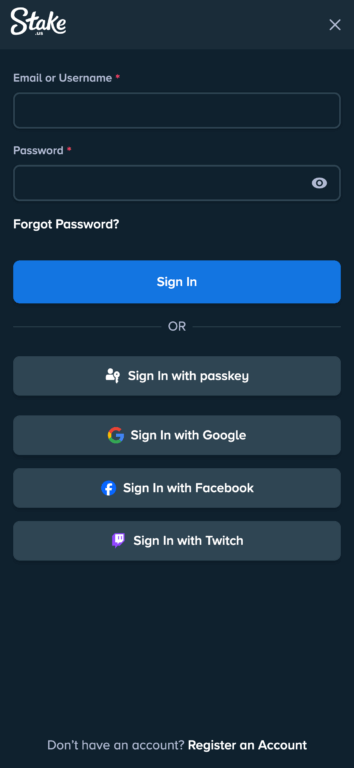
How to Log Into Stake US
Standard Login Procedure
Getting into your Stake.us account starts by going to https://stake.us in any modern web browser like Chrome, Safari, Firefox, or Edge on your computer or phone. You’ll see a grey “Login” button in the top-right corner of the homepage that stays in the same spot no matter what device you’re using. Click this button to open the login screen where you’ll choose how to sign in based on how you first registered.
The process of entering your login information changes depending on which method you chose, but you’ll typically need to fill in some fields and maybe complete extra security steps. If you have two-factor authentication turned on, you’ll need to enter a special code from your phone app or text message. The whole login process usually takes less than 30 seconds for returning users, and once you’re in, you’ll see your main account page with your current balances, available bonuses, and recent activity.
Manual Login
If you signed up with an email and password, you’ll start by typing either your registered email address or the username you chose in the first box. The site accepts both, which gives you flexibility in how you want to log in. In the second box, you’ll type your password exactly as you created it, including any capital letters, special symbols, and numbers.
Common mistakes include your browser automatically filling in wrong saved passwords, typing errors from different keyboard settings or languages, and mixing up similar email addresses if you have multiple accounts on different sites. The system tells you right away if your login information is wrong, so you can fix mistakes before getting locked out. After five wrong attempts in 15 minutes, your account gets temporarily locked for security.
When you successfully log in with your manual credentials, you get immediate access to all site features including the game library, account management tools, bonus collection, and customer support.
Social Media Login Options
Logging in through major social media platforms makes things easier for people who like to use the same login across multiple sites. Google login uses secure OAuth technology to check your identity through your existing Google account, so you don’t need to remember separate passwords while staying very secure. You just click the Google login button, sign in through Google’s secure system, and give Stake.us permission to access basic profile information needed for your account.
Facebook login works the same way by connecting to your existing Facebook account and using Facebook’s security system to verify who you are. This appeals to people who actively use Facebook and want to keep their online logins simple. Twitch account login serves content creators and streaming fans who are active on the platform.
Each social media login method has its own security features, which means if you need to change passwords or update security settings, you have to do it through that social media platform, not directly through Stake.us.
Passkey Authentication
The most modern login option available at Stake.us is passkey authentication, which eliminates passwords entirely in favor of biometric verification or device-based security. When you choose the passkey option, you’ll see three different methods depending on your device and preferences.
The iCloud Keychain option works seamlessly for Apple users who want to leverage their existing Apple ecosystem. This method uses Touch ID, Face ID, or your device passcode depending on which Apple device you’re using. The great advantage here is that your passkey automatically syncs across all your trusted Apple devices, so you can start logging in on your iPhone and seamlessly continue on your Mac without any additional setup.
The “Use a phone or tablet” option provides flexibility for cross-device authentication, which is particularly helpful when you’re on a computer but want to use your phone’s biometric features for verification. The system creates a secure connection between your devices, allowing you to complete authentication using your smartphone’s fingerprint scanner or face recognition while accessing Stake.us from your computer browser.
For users who prioritize maximum security, the USB security key option supports physical hardware devices like YubiKey or other FIDO2-compliant security keys. These small devices plug into your computer’s USB port, and you simply tap or activate them to prove your identity. This method provides the highest level of security since the authentication happens through a physical device that can’t be remotely hacked or duplicated.
Two-Factor Authentication Process
Adding two-factor authentication gives your account much better protection against unauthorized access, which is especially important since you can exchange Stake Cash for real money. When this feature is turned on, you’ll complete your normal login steps and then enter a six-digit code generated by phone apps like Google Authenticator, Authy, or Microsoft Authenticator.
These codes are time-sensitive and must be entered within 30 seconds, with new codes appearing every 30 seconds to keep security strong. If you have trouble with timing, you can get backup codes when you first set up the feature, giving you other ways to get in when your main authentication app isn’t available. The system also supports text message verification for people who prefer getting codes by SMS, though phone apps provide better security protection.
If you lose access to your two-factor authentication device, recovery involves contacting special support at accountrecovery@stake.us with detailed account verification including account creation information, recent transaction history, and identity verification documents. This recovery process usually takes 48-72 hours and includes multiple verification steps to prevent unauthorized people from taking over accounts.
Common Login Issues
Invalid Credentials
Authentication failures represent the most frequent support inquiry at Stake.us, typically coming from autocomplete errors or user confusion about their original registration method rather than actual password mistakes. Modern browsers often store multiple login credentials across similar domains, leading to automatic population of incorrect information that users may not notice before attempting authentication.
The platform’s requirement to use identical login methods from registration creates particular confusion for users returning after extended periods of not playing. Many users attempt multiple authentication approaches without remembering their original choice, triggering security lockouts after repeated failed attempts using different methods.
Password Recovery Process
Manual login account holders experiencing password difficulties can access recovery procedures through the “Forgot Password?” link on the main login interface. This recovery system sends secure reset links to registered email addresses within minutes, though users must check spam folders where automated emails frequently land due to aggressive filtering by major email providers.
The password reset link remains valid for exactly 24 hours after generation. Users must access the reset link from the same general geographic location as their account to prevent unauthorized reset attempts from different regions. The new password creation process requires meeting specific security criteria including minimum length requirements, character complexity standards, and restrictions against reusing recent passwords.
Social Media Login Recovery
Users who registered through Google, Facebook, or Twitch cannot reset passwords through Stake.us interfaces, as authentication credentials remain controlled by the respective social media platforms. This distributed security model requires users to manage password resets, security updates, and account recovery through their chosen social media provider’s support systems.
Google account recovery involves Google’s advanced verification system that may require alternative email addresses, phone number verification, or security question responses depending on account security settings and recovery history. Facebook password resets follow similar verification procedures but may include additional steps like friend verification or trusted device confirmation for accounts with enhanced security settings. Twitch offers streamlined recovery processes designed for users who primarily access it through gaming devices or mobile applications.
Login Bonus
The daily login bonus system at Stake.us gives much better value than competing sweepstakes casino sites, offering 10,000 Gold Coins plus 1 Stake Cash for every 24-hour period during your first 30 days after creating an account. This generous reward adds up to $30 worth of exchangeable Stake Cash over the first month, which is much better than industry standards where most competitors offer only 0.25 SC or less in daily bonuses.
Getting your daily login bonus requires you to actively participate rather than automatic crediting, making sure users engage with the platform and become familiar with available features. After successfully logging in, you go to your wallet section accessible through the main account dashboard or the wallet icon in the top navigation bar. The wallet shows your current Gold Coin and Stake Cash balances alongside available bonuses ready for claiming.
The “Claim” button appears next to available bonuses, with indication of the specific amounts ready for collection. Clicking this button immediately adds the rewards to your account balance, with real-time updates showing the new totals. The system includes visual confirmation of successful bonus claims through animated balance increases and notification messages confirming the specific amounts received.
Login Security Measures
Security architecture at Stake.us begins with 256-bit SSL encryption protecting all data transmission between user devices and platform servers, ensuring that login credentials, personal information, and financial details remain secure during communication.
Device recognition technology creates unique fingerprints for user devices based on browser configurations, screen specifications, installed fonts, and hardware characteristics. This system flags logins from new or unrecognized devices, triggering additional verification steps that may include email confirmation or extended authentication procedures. Users receive notifications when new device access occurs, enabling immediate action if unauthorized access attempts are detected.
Behavioral analysis algorithms continuously monitor user activity patterns including login frequencies, geographic consistency, gameplay behaviors, and transaction patterns to identify anomalies that could indicate compromised accounts. Brute force protection systems automatically implement account locks after five consecutive failed login attempts within a 15-minute window, preventing automated password guessing attacks.
Mobile Login Process
Accessing Stake.us through mobile browsers follows identical procedures to desktop login, beginning with navigation to stake.us through Safari, Chrome, Firefox, or other compatible mobile browsers. The responsive design automatically detects mobile devices and adjusts interface elements for optimal touch interaction while maintaining all authentication options including manual credentials and social media login integration.
Mobile interface optimization includes enlarged touch targets for login buttons and input fields, simplified navigation menus optimized for smaller screens, and streamlined authentication flows that accommodate virtual keyboard limitations. The login process remains identical to desktop procedures, requiring users to select their registration method and complete authentication steps including two-factor verification when enabled.
Frequently Asked Questions
Q: What’s the difference between Stake.us and Stake.com login?
A: Stake.us and Stake.com have completely separate login systems that don’t connect to each other. You cannot transfer accounts between platforms or use the same login credentials on both sites.
Q: What if I forget which login method I used?
A: Try to remember by thinking about how you typically sign up for new services. If you usually use Google or Facebook for quick registration, try those first. If you prefer creating unique passwords, try the manual email/password option.
Q: Can I use a VPN to login at Stake.us?
A: No, VPN usage is strictly prohibited and will result in immediate account suspension.
Q: What happens if I try to log in from a restricted state?
A: The platform uses location tracking to block access from restricted states. If you’re traveling and try to access from a restricted state, you’ll be temporarily blocked until you return to an eligible location.